Changelog
Sync and Sidebar UX Improvements
What’s New
- Don’t redirect to Pushed changes if there are more unstaged changes not pushed.
- Updated the right sidebar to allow for collapsible data, show the file name on all tabs, and make the tabs text based and easier to read.
- Added a retry all failed commits button to retry all commits currently in progress. This is accessible on the Push History view.
- Updated the sync status indicator! It is now in the top left, and will give you clearer updates on progress of syncs in the app.
Custom Attribute Scopes
Custom Attributes updates
We have added 2 new features to custom attributes!
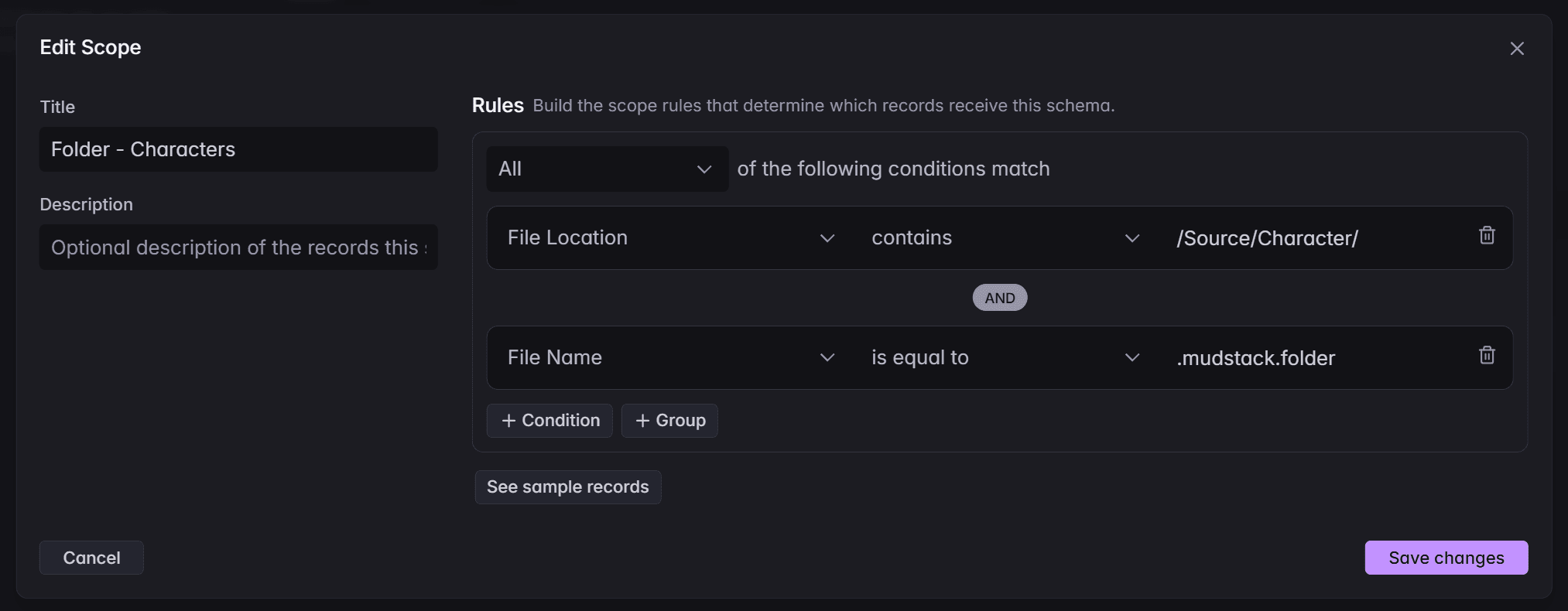
The first big update is support for attributes on folders, file versions, and libraries, is now available with custom attributes, so your team can enrich files from a singular version all the way up to groups of files in folders and libraries!
Attributes can also be placed within a scope, or filtered set, of files, file versions, or libraries. This will allow you to add attributes to specific file types, like a polycount attribute on 3d files, or a Miro board link on a character folder.
What else is new?
- Added some additional confirmations on certain actions within Mudstack
- Performance improvements on syncing and permission lookups
Bugs
- Sync status wouldn’t update properly on restart
- Should no longer see a new folder for root when first launching a newly mapped workspace
- Cutting and pasting a folder in explorer was not tracking the folder as a move
- The log file wouldn’t open in the help menu on windows
Bulk Agent Performance and UX Improvements
What’s new?
- Searching has been changed to now allow you to search with AI in the top search bar! You’ll also have a new autocomplete area for quickly finding a file or folder.
- Bulk Push speed improvements
- Added stability to AI bulk tool calls
- Folders are now clickable if they are a result in the AI chat
- Allow copying share links without sending an email
- Preserve folder marker on undo actions for a folder move in finder and explorer
Bug Fixes
- Some discards would fail to complete
- Member details page had a chance of crashing when opened
- Prevent folders from getting generated when other users rename subfolders with content
- Pushing a library that has been pinned had some issues
- Stopped an error occurring if you created a workspace in the web app then attempted to map it on a local app shortly after.
- Large commits and discards no longer silently drop on error. Added some stability to group the changes together.
Gallery View and Bug Fixes
What’s new?
- Gallery View added to search! The gallery area support zooming, panning multiselect, and arrow key navigation.
- Added an option in the Help → Troubleshooting menu to Resync Workspace. This will attempt to match any cloud data that may have drifted during work.
- Show a notification if staging is blocked on locked and conflicted items.
- Agent can now get all libraries for easier library searching.
Bug Fixes
- Resolved an issue where changes in synced folders would resolve incorrectly.
- Fixed an issue where certain items can’t be discarded from the changes list.
- Workspaces and accounts lists should sync without the need for app restart.
- Enabling an account plugin after upload would sometimes show an error until restart.
- Reduce size in getting workspace data by focusing on the currently selected workspace.
Account Plugins, Folder Syncing, Agent Updates, and more!
We have a few large updates to Mudstack we’re excited to give to y’all!
🌄What's New?
Folder Syncing
Mudstack can now track changes to folders!
Scaffold out folders and push it for the team without having to add stub files. When reorganizing your workspace, the folder tracking should also ensure everyone is getting all of your pushed folder changes.
Account Plugins
Account-Based Plugins let studios upload, version, and manage custom plugins directly in Mudstack. Admins control plugin availability at the account level, while the Mudstack desktop app automatically installs and updates plugins on startup.
Account plugins can be distributed to your team, where your team can enable and disable them locally.
Other Plugin Updates
- Targa substance plugins config settings to properly set dimensions
Custom Attributes (beta)
Custom attributes let you define your own metadata fields on files in a workspace. Attributes for production status, external IDs, links to tools like Jira or Miro, or technical data such as poly counts can now be added to your files for a richer search experience.
For the admins, we also have a validation step to check if any values are impacted from attribute changes you make so data doesn’t get lost.
Combining custom attributes, webhooks, and our API to integrate Mudstack with all of you other production apps.
https://docs.mudstack.com/features/custom-attributes
We are actively looking for feedback on custom attributes. Let us know if you are interested in it, and we’ll add it to your account!
Agent Updates
- Bulk tasks are added as tools for larger tasks
- For tasks that can't be done in bulk, we'll collapse the tools in a group
- Updated the UX of the tool calls so the chat is more focused on the Agents messages
- Added more context to the agent: folder location, staged status on changes, and selected staged and unstaged changes.
- Cleaned up search responses with file extensions
- Renamed all tools to be more human readable
- Added a tool to remove tags from files
- Files are now clickable links in the agent response, so you can get to files faster
🐝Bug Fixes
- The left scroll bar could cut off some options in the settings view when zoomed in
- Fixed a push history search issue while pulling a large amount of content
- Fixed a few sync states on unmapped workspaces
- Fixed a rename issue on windows when renaming a file before a save completes in another application
- Error column in the push details can have its width increased